
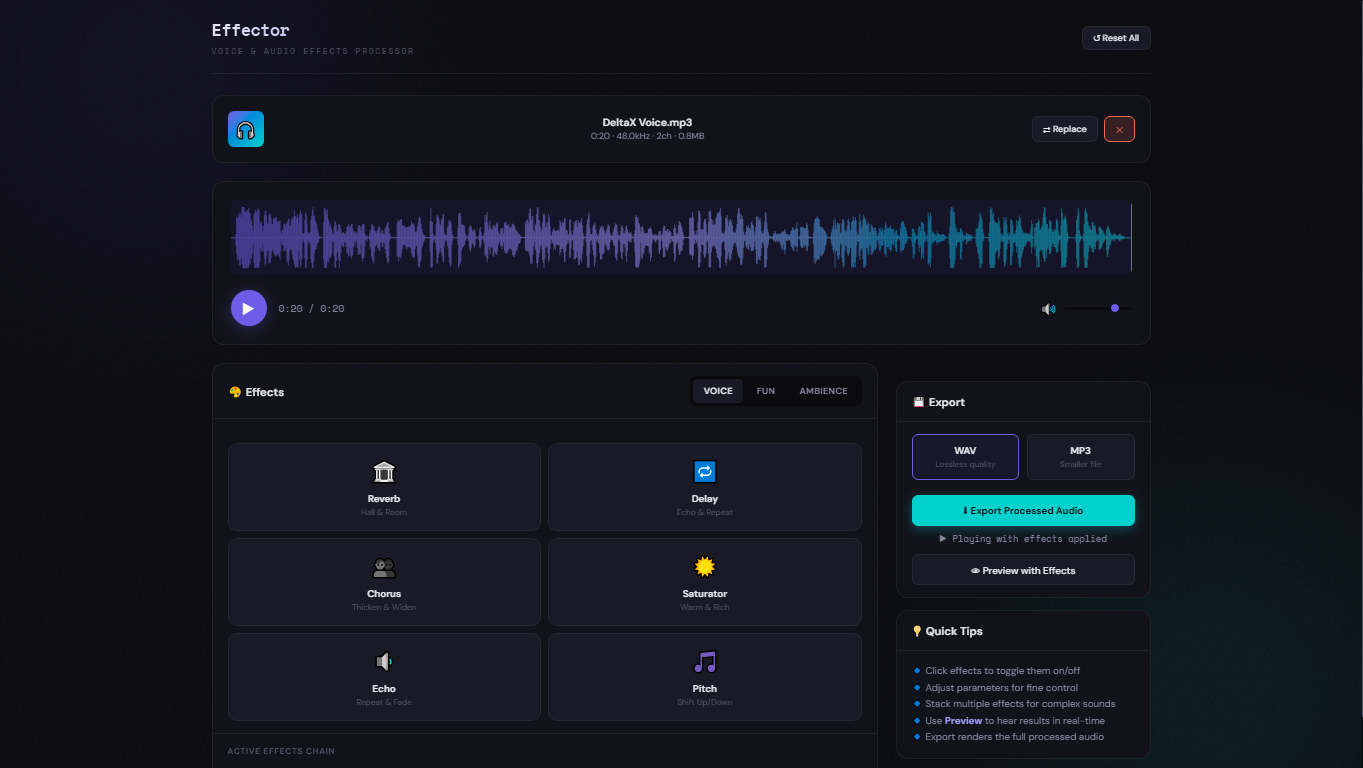
In the modern era of digital storytelling, the right sound can make all the difference. Whether you want to add professional depth to your voice or completely transform it for a creative project, Effector is the powerful, all-in-one solution designed for creators who demand professional results without the complexity of traditional software.
Professional Audio Effects at Your Fingertips
Effector offers a comprehensive library of effects, categorized into three distinct sections to suit any production need:
1. Voice Effects (The Professional Touch)
- Reverb: Simulates different spaces from small rooms to large halls, adding depth and “air” to your voice.
- Delay & Echo: Creates repeating patterns and echoes, perfect for rhythmic parts or adding a sense of space.
- Chorus: Thickens and widens the vocal signal by simulating multiple voices, providing a richer sound.
- Saturator: Adds warmth and harmonic richness, giving your audio a “vintage” or analog feel.
- Pitch Shifter: Allows you to shift the musical key of your voice up or down in semitones.
2. Fun Effects (Creative Transformation)
- Robot: Gives your voice a metallic, synthesized quality using frequency modulation.
- Telephone & Megaphone: Filters your audio to mimic the lo-fi bandwidth of a phone call or the harsh, loud projection of a megaphone.
- Cartoon & Deep Voice: Specialized pitch shifting combined with speed or “rumble” adjustments for character-like results.
- Horror: A combination of dark reverb and lowered pitch for an eerie, supernatural effect.
3. Ambience Effects (Immersive Environments)
- Cave & Stadium: Massive reverb profiles that place your voice in giant, cavernous, or open-air settings.
- Underwater: Muffles the sound and adds a “wobble” effect to simulate being submerged.
- Vintage Radio: Warm filters combined with artificial “crackle” for a nostalgic feel.
- Whisper: Enhances the airiness and breathiness of the recording for an intimate, soft tone.
NEW: Region-Based Editing — Apply Different Effects to Different Parts
The biggest upgrade in Effector is the new region selection and Apply workflow, bringing DAW-level precision to a browser-based tool. Instead of applying a single effect to the entire audio, you can now target specific sections with surgical accuracy.
How it works:
- Drag on the waveform to highlight the exact region you want to process. A pink selection overlay shows your chosen area with precise timestamps.
- Select one or more effects and fine-tune the parameters with dedicated sliders.
- Preview plays back only the selected region with the effects applied — so you hear exactly what will change before committing.
- Apply bakes the effects permanently into that region. The waveform redraws to reflect the change, and a green marker appears showing where effects have been applied.
- Select a new region, pick different effects, and repeat. Build complex, layered soundscapes one section at a time.
This means you can add reverb to your intro, apply a robot voice to a specific line, add an underwater effect to a transition — all within the same audio file, all in one session.
Full Undo support: Made a mistake? The Undo button reverts the last applied effect, restoring the audio to its previous state. You can undo up to 20 steps, giving you complete creative freedom to experiment without risk.
Visual feedback: Every applied effect is tracked in the Applied Effects History panel and visually marked on the waveform with green indicators, so you always know what has been processed and where.
Ideal for Podcasters and Broadcasters
Effector is a “Swiss Army Knife” for podcasters, broadcasters, and YouTubers. It allows you to:
- Quickly clean up and warm your voice with professional saturators and EQs.
- Create distinct characters for audio dramas or storytelling — apply a different voice effect to each character’s lines.
- Add high-quality intros and outros with cinematic space effects, while keeping the main content untouched.
- Process specific problem areas (background noise, plosives) without affecting the rest of the recording.
Browser-Powered Convenience
The most impressive feature of Effector is that it is 100% browser-based. There is no installation required and no heavy software to download. It supports all major audio formats (MP3, WAV, OGG, FLAC) and handles everything locally in your browser, ensuring your privacy and speed. When you’re done, simply export your processed audio in lossless WAV or compressed MP3 (320kbps / 48kHz) format.
Ready to transform your audio? Try Effector today and let your voice be heard like never before!